> ## Documentation Index
> Fetch the complete documentation index at: https://docs.mainwp.com/llms.txt
> Use this file to discover all available pages before exploring further.
# Patchstack
> The Patchstack add-on connects your MainWP Dashboard with your Patchstack account so you can see vulnerability and protection data for all connected child sites without leaving MainWP.
## What You'll Learn
* Connecting your Patchstack account to MainWP
* Registering and protecting child sites
* Viewing vulnerability and attack data
* Configuring API sync and notifications
***
The Patchstack add-on connects your MainWP Dashboard with your Patchstack account. View vulnerability and protection data for all connected child sites without leaving MainWP.
**Key features:**
* View protection status, vulnerabilities, recent attacks, and available updates
* Track trends with global and per-site widgets (attacks blocked, active threats, firewall logs)
* Include Patchstack stats in the MainWP Overview and Pro Reports
## Requirements
| Requirement | Details |
| - | - |
| MainWP Dashboard | Installed and connected to child sites (MainWP Child plugin active) |
| Patchstack account | Developer plan or higher with API access |
| Plan allowance | Number of sites included in your Patchstack plan |
| Network access | Outbound HTTPS from Dashboard server to `https://api.patchstack.com/monitor` |
The MainWP Patchstack Integration is available with both MainWP Essentials and MainWP Pro. Patchstack is a separate paid service, and you need a Patchstack Developer plan or higher with API access to use the integration.
The Patchstack firewall runs on child sites via the Patchstack Security plugin. This add-on manages setup and gathers data in MainWP. Patchstack provisioning supports publicly accessible websites; localhost and private network sites are not supported.
## Connect Your Patchstack Account
Go to **MainWP > Sites > Security > Patchstack Integration > Settings**.
Paste your API key from **Patchstack > Settings > Integrations** into the **Patchstack API key** field.
Enter the number of sites included in your Patchstack plan in **Plan allowance (sites)**. Enter `0` if your plan should be treated as unlimited in MainWP.
Choose **Daily**, **Weekly**, **Monthly**, or **Disabled** for **Patchstack API sync frequency**.
Toggle **Email notifications** to receive alerts when Patchstack finds new vulnerabilities.
Click **Save Settings**. Saving a new key clears previous site bindings, so plan to resync immediately.
**Per-site overrides:** Open a child site's **Sites > Manage Sites > Patchstack Integration > Settings**, enable **Override general settings**, and provide site-specific values.
## Register and Protect Child Sites
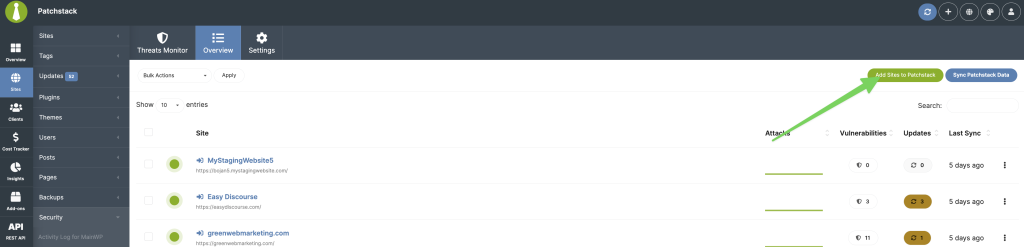
Go to **MainWP > Sites > Security > Patchstack Integration** (Overview tab) and click **Add Sites to Patchstack**.
Choose the child sites you want to protect and click **Protect With Patchstack**.
Review the number of sites being added, the current and resulting totals, and your configured plan allowance. Adding sites beyond that allowance may increase your Patchstack bill. Click **Yes, proceed!** to continue, or **Cancel** to return to the selection.
If the allowance is **Not configured**, MainWP disables the proceed button. Save **Plan allowance (sites)** in the Settings tab first. Enter the allowance for your Patchstack plan, or `0` for an unlimited allowance.
The wizard registers each site with Patchstack, installs and activates the Patchstack plugin on the child site, activates the Patchstack license, syncs data, and refreshes the dashboard.
Close the modal once all rows show a green check. Rerun this flow when you add new child sites.
**Manual sync options:**
* **Sync Patchstack Data** (top-right): Syncs all linked sites
* **Sync API Data** (row ellipsis menu): Syncs individual sites
The sync dialog reports progress and results for each site. A completed progress bar means all requests finished; check for **Process completed with errors.** and hover over a site's red error icon for its error details. When all requests succeed, the page refreshes automatically.
## Where to View Data
### Add-on Overview Tab
The DataTable lists each protected site with firewall status, 7-day attack sparkline, total vulnerabilities, outdated components, and time since last sync.
In version 6.1, the overview loads results as you search, sort, or change pages:
* Search by site name or URL.
* Click the sortable **Attacks**, **Vulnerabilities**, **Updates**, or **Last Sync** column headings to change the order.
* Use the page controls and page-size selector to browse larger site lists.
* Wait for the loading indicator to finish before selecting rows or starting another action.
Hover over a site's colored status indicator for details. Green means the firewall is active, yellow means the firewall or plugin is missing or turned off, and red indicates a deactivated plugin. If no sites with the Patchstack plugin are found, the overview displays an empty-state message.
**Row actions:** View details, update the Patchstack plugin when an update is available, sync API data, hide or unhide the plugin, edit the site, or remove the site.
To hide the Patchstack plugin from a child site's installed plugins list and admin menu, open the site's row ellipsis menu and select **Hide Plugin**. Select **Unhide Plugin** from the same menu to restore its visibility.
**Bulk actions:** Update Patchstack plugin, sync API data, or remove multiple sites.
Select the intended rows before choosing a bulk action. Review confirmation and warning messages, especially when adding sites or removing protection.
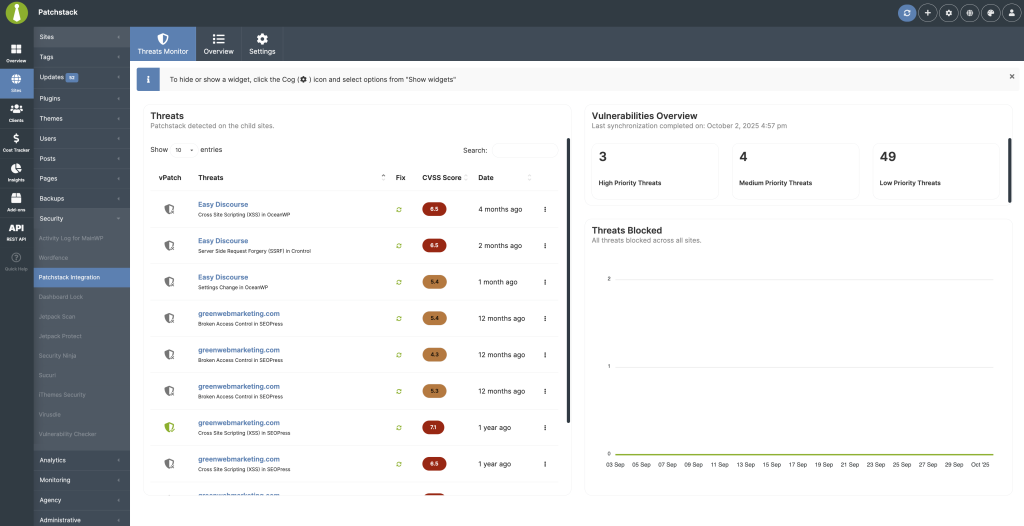
### Add-on Threats Tab
| Widget | Contents |
| - | - |
| Threats | Vulnerabilities with mitigation status, fix availability, CVSS score, dates, and links |
| Vulnerabilities Overview | High, medium, and low priority threat counts |
| Threats Blocked | Attack volume chart over time |
Use the cog icon (screen options) to show/hide widgets or reset layout.
### Child Site Overview Widget
Open **MainWP > Sites > Manage Sites > Patchstack Integration** for per-site Threats Monitor data, override controls, and focused stats.
### Main Overview Widget
Enable the **Patchstack Security Status** widget on the MainWP Overview or individual site dashboards for a compact summary with **Vulnerabilities**, **Protection stats**, and **Protected Sites** tabs.
## Add-on Settings
Navigate to **MainWP > Sites > Security > Patchstack Integration > Settings**.
| Setting | Description |
| - | - |
| Patchstack API key | Connects MainWP Dashboard to your Patchstack account |
| Plan allowance (sites) | Tracks your Patchstack site allowance for dashboard usage indicators and billing warnings |
| Patchstack API sync frequency | Daily, weekly, monthly, or disabled cadence (relies on WP Cron or alternate scheduler) |
| Email notifications | Toggle alerts and customize recipients/templates through **MainWP > Settings > Email Settings** |
| Per-site overrides | Let specific clients use different API keys, schedules, or notification preferences |
***
## Related Resources
* [Security Add-ons](/add-ons/security) - Browse all security tools
* [Vulnerability Checker Extension](/add-ons/security/vulnerability-checker-extension) - Alternative vulnerability scanning
* [Pro Reports Extension](/add-ons/agency/pro-reports-extension-overview) - Include Patchstack stats in reports
This documentation is built and hosted on [Mintlify](https://mintlify.com), a developer documentation platform.
 ## Requirements
| Requirement | Details |
| - | - |
| MainWP Dashboard | Installed and connected to child sites (MainWP Child plugin active) |
| Patchstack account | Developer plan or higher with API access |
| Plan allowance | Number of sites included in your Patchstack plan |
| Network access | Outbound HTTPS from Dashboard server to `https://api.patchstack.com/monitor` |
## Requirements
| Requirement | Details |
| - | - |
| MainWP Dashboard | Installed and connected to child sites (MainWP Child plugin active) |
| Patchstack account | Developer plan or higher with API access |
| Plan allowance | Number of sites included in your Patchstack plan |
| Network access | Outbound HTTPS from Dashboard server to `https://api.patchstack.com/monitor` |
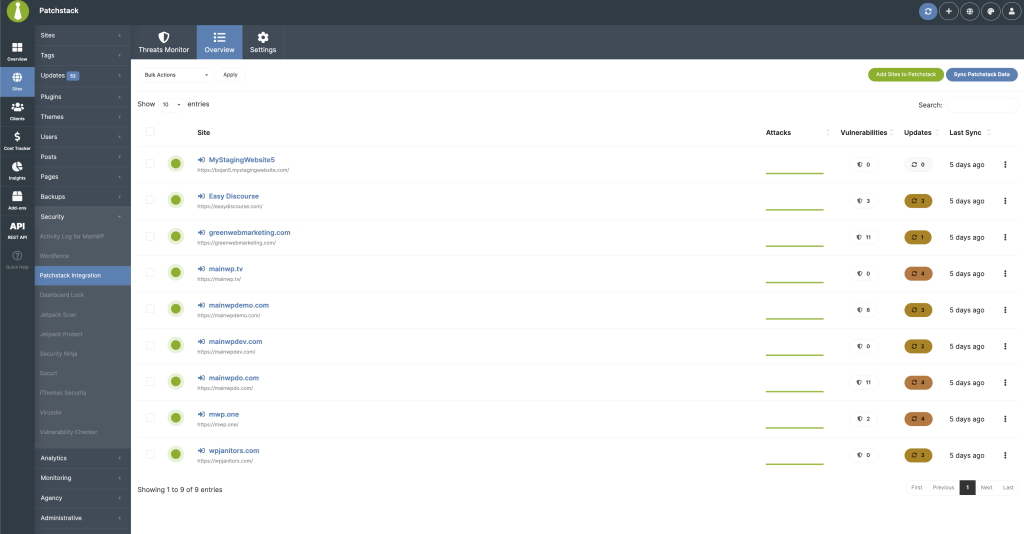 ### Add-on Overview Tab
The DataTable lists each protected site with firewall status, 7-day attack sparkline, total vulnerabilities, outdated components, and time since last sync.
In version 6.1, the overview loads results as you search, sort, or change pages:
* Search by site name or URL.
* Click the sortable **Attacks**, **Vulnerabilities**, **Updates**, or **Last Sync** column headings to change the order.
* Use the page controls and page-size selector to browse larger site lists.
* Wait for the loading indicator to finish before selecting rows or starting another action.
Hover over a site's colored status indicator for details. Green means the firewall is active, yellow means the firewall or plugin is missing or turned off, and red indicates a deactivated plugin. If no sites with the Patchstack plugin are found, the overview displays an empty-state message.
**Row actions:** View details, update the Patchstack plugin when an update is available, sync API data, hide or unhide the plugin, edit the site, or remove the site.
To hide the Patchstack plugin from a child site's installed plugins list and admin menu, open the site's row ellipsis menu and select **Hide Plugin**. Select **Unhide Plugin** from the same menu to restore its visibility.
**Bulk actions:** Update Patchstack plugin, sync API data, or remove multiple sites.
Select the intended rows before choosing a bulk action. Review confirmation and warning messages, especially when adding sites or removing protection.
### Add-on Threats Tab
| Widget | Contents |
| - | - |
| Threats | Vulnerabilities with mitigation status, fix availability, CVSS score, dates, and links |
| Vulnerabilities Overview | High, medium, and low priority threat counts |
| Threats Blocked | Attack volume chart over time |
Use the cog icon (screen options) to show/hide widgets or reset layout.
### Child Site Overview Widget
Open **MainWP > Sites > Manage Sites > Patchstack Integration** for per-site Threats Monitor data, override controls, and focused stats.
### Main Overview Widget
Enable the **Patchstack Security Status** widget on the MainWP Overview or individual site dashboards for a compact summary with **Vulnerabilities**, **Protection stats**, and **Protected Sites** tabs.
## Add-on Settings
### Add-on Overview Tab
The DataTable lists each protected site with firewall status, 7-day attack sparkline, total vulnerabilities, outdated components, and time since last sync.
In version 6.1, the overview loads results as you search, sort, or change pages:
* Search by site name or URL.
* Click the sortable **Attacks**, **Vulnerabilities**, **Updates**, or **Last Sync** column headings to change the order.
* Use the page controls and page-size selector to browse larger site lists.
* Wait for the loading indicator to finish before selecting rows or starting another action.
Hover over a site's colored status indicator for details. Green means the firewall is active, yellow means the firewall or plugin is missing or turned off, and red indicates a deactivated plugin. If no sites with the Patchstack plugin are found, the overview displays an empty-state message.
**Row actions:** View details, update the Patchstack plugin when an update is available, sync API data, hide or unhide the plugin, edit the site, or remove the site.
To hide the Patchstack plugin from a child site's installed plugins list and admin menu, open the site's row ellipsis menu and select **Hide Plugin**. Select **Unhide Plugin** from the same menu to restore its visibility.
**Bulk actions:** Update Patchstack plugin, sync API data, or remove multiple sites.
Select the intended rows before choosing a bulk action. Review confirmation and warning messages, especially when adding sites or removing protection.
### Add-on Threats Tab
| Widget | Contents |
| - | - |
| Threats | Vulnerabilities with mitigation status, fix availability, CVSS score, dates, and links |
| Vulnerabilities Overview | High, medium, and low priority threat counts |
| Threats Blocked | Attack volume chart over time |
Use the cog icon (screen options) to show/hide widgets or reset layout.
### Child Site Overview Widget
Open **MainWP > Sites > Manage Sites > Patchstack Integration** for per-site Threats Monitor data, override controls, and focused stats.
### Main Overview Widget
Enable the **Patchstack Security Status** widget on the MainWP Overview or individual site dashboards for a compact summary with **Vulnerabilities**, **Protection stats**, and **Protected Sites** tabs.
## Add-on Settings
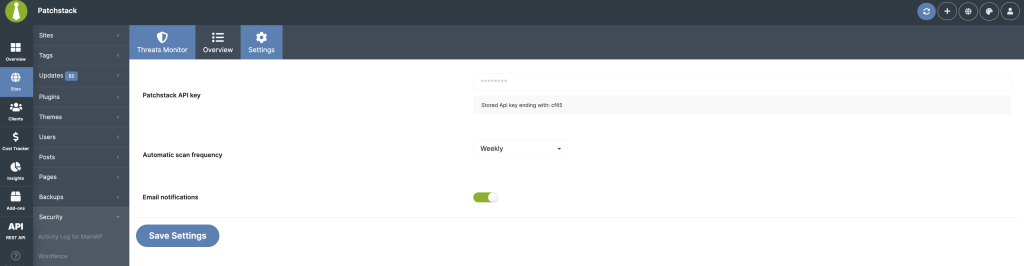 Navigate to **MainWP > Sites > Security > Patchstack Integration > Settings**.
| Setting | Description |
| - | - |
| Patchstack API key | Connects MainWP Dashboard to your Patchstack account |
| Plan allowance (sites) | Tracks your Patchstack site allowance for dashboard usage indicators and billing warnings |
| Patchstack API sync frequency | Daily, weekly, monthly, or disabled cadence (relies on WP Cron or alternate scheduler) |
| Email notifications | Toggle alerts and customize recipients/templates through **MainWP > Settings > Email Settings** |
| Per-site overrides | Let specific clients use different API keys, schedules, or notification preferences |
***
## Related Resources
* [Security Add-ons](/add-ons/security) - Browse all security tools
* [Vulnerability Checker Extension](/add-ons/security/vulnerability-checker-extension) - Alternative vulnerability scanning
* [Pro Reports Extension](/add-ons/agency/pro-reports-extension-overview) - Include Patchstack stats in reports
This documentation is built and hosted on [Mintlify](https://mintlify.com), a developer documentation platform.
Navigate to **MainWP > Sites > Security > Patchstack Integration > Settings**.
| Setting | Description |
| - | - |
| Patchstack API key | Connects MainWP Dashboard to your Patchstack account |
| Plan allowance (sites) | Tracks your Patchstack site allowance for dashboard usage indicators and billing warnings |
| Patchstack API sync frequency | Daily, weekly, monthly, or disabled cadence (relies on WP Cron or alternate scheduler) |
| Email notifications | Toggle alerts and customize recipients/templates through **MainWP > Settings > Email Settings** |
| Per-site overrides | Let specific clients use different API keys, schedules, or notification preferences |
***
## Related Resources
* [Security Add-ons](/add-ons/security) - Browse all security tools
* [Vulnerability Checker Extension](/add-ons/security/vulnerability-checker-extension) - Alternative vulnerability scanning
* [Pro Reports Extension](/add-ons/agency/pro-reports-extension-overview) - Include Patchstack stats in reports
This documentation is built and hosted on [Mintlify](https://mintlify.com), a developer documentation platform.