> ## Documentation Index
> Fetch the complete documentation index at: https://docs.mainwp.com/llms.txt
> Use this file to discover all available pages before exploring further.
# Custom Dashboard
> Customize the layout, appearance, and functionality of your MainWP Dashboard with this Extension to create an interface that suits your needs.
## What You'll Learn
* Adding custom PHP, CSS, and JavaScript to your Dashboard
* Where custom code is stored and executed
* Using the built-in code editor (CodeMirror 6) with autocompletion, code folding, and the One Dark theme
* Validating PHP snippets before saving with the built-in syntax check
* Keeping your draft when a save conflicts with another change
* Previewing and applying snippet changes through MainWP abilities
* Handling PHP errors safely
* Accessing example code snippets
***
**Extension Add-on** - This add-on provides standalone functionality within MainWP Dashboard. No third-party plugins required.
The MainWP Custom Dashboard Extension is designed to contain your custom snippets for your MainWP Dashboard.
By adding custom snippets to this plugin, you can easily extend your MainWP Dashboard functionality or change the way it looks.
After activation, open it from **Add-ons > Administrative > Custom Dashboard** in MainWP Dashboard.
This extension will help you to keep all your changes in one location and independent of the other components.
This enables you to safely update your MainWP Dashboard plugin on your MainWP Dashboard site without worry about losing your modifications as well as deactivating your custom code if needed for troubleshooting.
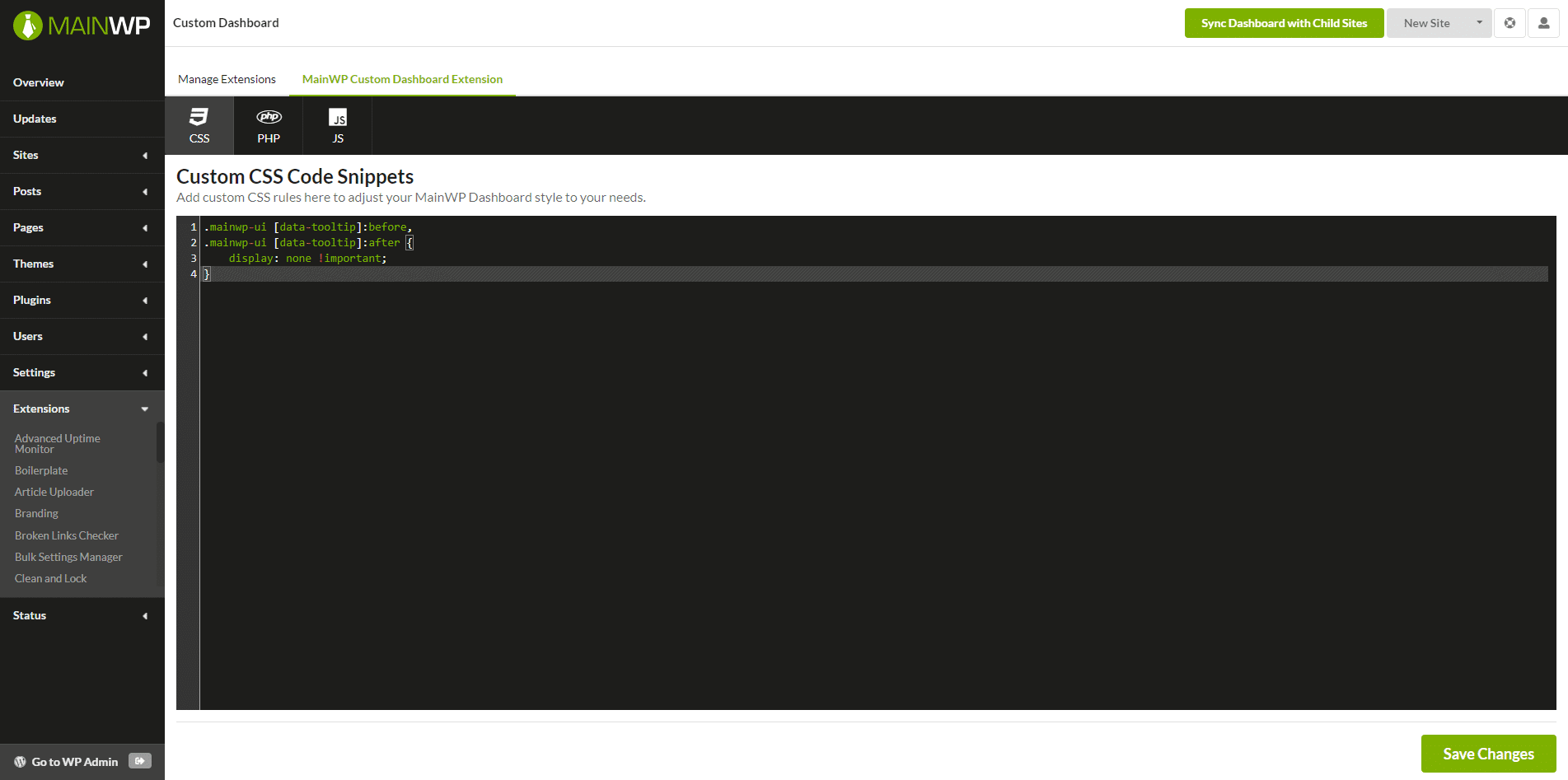
The built-in code editor allows you to add your code directly through the extension interface.
**No FTP access is required.**
Check out our Github repository where we keep example snippets that will help you get started:
* [CSS Code Snippets](https://github.com/mainwp/mainwp-custom-dashboard-extension-examples/tree/master/css)
* [PHP Code Snippets](https://github.com/mainwp/mainwp-custom-dashboard-extension-examples/tree/master/php)
* [JS Code Snippets](https://github.com/mainwp/mainwp-custom-dashboard-extension-examples/tree/master/js)
## How It Works
MainWP Custom Dashboard Extension saves your PHP, CSS, and JS snippets in WordPress options on your MainWP Dashboard site instead of requiring separate PHP, CSS, or JS files.
CSS and JS snippets are added inline on MainWP admin pages, except Child site tabs. They do not load on other WordPress admin pages or the front end.
Saved PHP snippets run during WordPress initialization using `eval()`. Their scope includes all WordPress requests on the MainWP Dashboard site, not just MainWP admin pages. Add conditions or hooks in your PHP code when it should run only in a specific context.
MainWP Custom Dashboard Extension is used to apply custom code snippets to the MainWP Dashboard site ONLY!
It doesn't apply code to child sites.
To apply custom code snippets to child sites, please see the [MainWP Code Snippets Extension](https://mainwp.com/extension/code-snippets/).
## The Code Editor
The editor is powered by CodeMirror 6 and ships with productivity features enabled by default:
* **Syntax highlighting** for PHP, CSS, and JavaScript
* **One Dark** theme for better readability
* **Autocompletion** as you type
* **Automatic bracket closing** for `()`, `{}`, `[]`, and quotes
* **Code folding** with gutter handles and keyboard shortcuts
* **Tab indentation** that respects natural tab behavior inside the editor
Use the language tab at the top of the page to switch between the PHP, CSS, and JS editors. Each language is saved independently.
### Handling a Save Conflict
Version 5.2 checks whether the saved snippet has changed since you opened the editor. If another user, browser tab, or API request changes it first, your save is rejected instead of overwriting that change.
Your draft remains in the open editor, and the page does not automatically reload after the conflict. To continue:
1. Copy your draft somewhere safe before reloading. It is not automatically saved as a recoverable draft.
2. Reload the editor to load the latest saved snippet, compare it with your draft, and combine the changes you want to keep.
3. Save again from the refreshed editor.
If you kept the editor open while upgrading to 5.2, copy any unsaved work and reload before saving so the editor can send the required snippet revision.
## Writing PHP Snippets
PHP snippets are saved as **tagless** PHP — write your code without `` tags. The extension validates this on save and rejects snippets that contain PHP tags.
```php theme={null}
// ✅ Correct — no opening or closing tags
add_action( 'admin_footer', function () {
echo '';
} );
```
```php theme={null}
// ❌ Rejected — PHP tags are not allowed inside the editor
';
} );
?>
```
### Pre-save syntax validation
Before a PHP snippet is saved, the extension parses the code without executing it. Malformed snippets are rejected, and the editor displays a validation message. The same parse-only check is used by the PHP validation and replacement-preview abilities.
Top-level `namespace`, `declare`, and `use` import statements are also rejected because snippets are executed as inline PHP rather than standalone PHP files. A closure's `use (...)` clause is allowed.
Passing validation confirms syntax only. It does not prove that the snippet will behave correctly or safely when it later runs.
### Runtime error handling
For a matching parse or compile fatal error, the extension shows a recovery message with a reference and a link back to the PHP editor. The **Go to fix the snippet** link opens the editor with snippet execution skipped for that recovery request:
Other runtime exceptions (`Throwable`s) thrown by a snippet are caught and logged instead of taking down the page.
## Abilities API
Version 5.2 adds four MainWP abilities to read snippet status without returning saved code, validate proposed PHP without storing or running it, and preview or apply replacements and removals for PHP, CSS, and JavaScript.
Changes require the current snippet revision and explicit confirmation. Previews report the proposed effect without saving it. PHP previews check syntax; CSS and JavaScript previews do not lint or execute the supplied code.
See [Custom Dashboard Abilities](/api-reference/abilities-api/custom-dashboard) for authentication, permissions, examples, and conflict handling. These abilities affect the MainWP Dashboard site only.
***
## Related Resources
* [Custom Dashboard Abilities](/api-reference/abilities-api/custom-dashboard) - Inspect, validate, and manage snippets through the API
* [Development Add-ons](/add-ons/development) - Browse all development tools
* [Code Snippets Extension](/add-ons/development/code-snippets-extension) - Deploy code to child sites
* [Dashboard Themes](/customization/how-to-change-the-theme-for-mainwp) - MainWP Dashboard appearance and theme behavior
This documentation is built and hosted on [Mintlify](https://mintlify.com), a developer documentation platform.
 This extension will help you to keep all your changes in one location and independent of the other components.
This enables you to safely update your MainWP Dashboard plugin on your MainWP Dashboard site without worry about losing your modifications as well as deactivating your custom code if needed for troubleshooting.
The built-in code editor allows you to add your code directly through the extension interface.
**No FTP access is required.**
Check out our Github repository where we keep example snippets that will help you get started:
* [CSS Code Snippets](https://github.com/mainwp/mainwp-custom-dashboard-extension-examples/tree/master/css)
* [PHP Code Snippets](https://github.com/mainwp/mainwp-custom-dashboard-extension-examples/tree/master/php)
* [JS Code Snippets](https://github.com/mainwp/mainwp-custom-dashboard-extension-examples/tree/master/js)
## How It Works
MainWP Custom Dashboard Extension saves your PHP, CSS, and JS snippets in WordPress options on your MainWP Dashboard site instead of requiring separate PHP, CSS, or JS files.
CSS and JS snippets are added inline on MainWP admin pages, except Child site tabs. They do not load on other WordPress admin pages or the front end.
Saved PHP snippets run during WordPress initialization using `eval()`. Their scope includes all WordPress requests on the MainWP Dashboard site, not just MainWP admin pages. Add conditions or hooks in your PHP code when it should run only in a specific context.
MainWP Custom Dashboard Extension is used to apply custom code snippets to the MainWP Dashboard site ONLY!
It doesn't apply code to child sites.
To apply custom code snippets to child sites, please see the [MainWP Code Snippets Extension](https://mainwp.com/extension/code-snippets/).
## The Code Editor
The editor is powered by CodeMirror 6 and ships with productivity features enabled by default:
* **Syntax highlighting** for PHP, CSS, and JavaScript
* **One Dark** theme for better readability
* **Autocompletion** as you type
* **Automatic bracket closing** for `()`, `{}`, `[]`, and quotes
* **Code folding** with gutter handles and keyboard shortcuts
* **Tab indentation** that respects natural tab behavior inside the editor
Use the language tab at the top of the page to switch between the PHP, CSS, and JS editors. Each language is saved independently.
### Handling a Save Conflict
Version 5.2 checks whether the saved snippet has changed since you opened the editor. If another user, browser tab, or API request changes it first, your save is rejected instead of overwriting that change.
Your draft remains in the open editor, and the page does not automatically reload after the conflict. To continue:
1. Copy your draft somewhere safe before reloading. It is not automatically saved as a recoverable draft.
2. Reload the editor to load the latest saved snippet, compare it with your draft, and combine the changes you want to keep.
3. Save again from the refreshed editor.
If you kept the editor open while upgrading to 5.2, copy any unsaved work and reload before saving so the editor can send the required snippet revision.
## Writing PHP Snippets
PHP snippets are saved as **tagless** PHP — write your code without `` tags. The extension validates this on save and rejects snippets that contain PHP tags.
```php theme={null}
// ✅ Correct — no opening or closing tags
add_action( 'admin_footer', function () {
echo '';
} );
```
```php theme={null}
// ❌ Rejected — PHP tags are not allowed inside the editor
';
} );
?>
```
### Pre-save syntax validation
Before a PHP snippet is saved, the extension parses the code without executing it. Malformed snippets are rejected, and the editor displays a validation message. The same parse-only check is used by the PHP validation and replacement-preview abilities.
Top-level `namespace`, `declare`, and `use` import statements are also rejected because snippets are executed as inline PHP rather than standalone PHP files. A closure's `use (...)` clause is allowed.
Passing validation confirms syntax only. It does not prove that the snippet will behave correctly or safely when it later runs.
### Runtime error handling
For a matching parse or compile fatal error, the extension shows a recovery message with a reference and a link back to the PHP editor. The **Go to fix the snippet** link opens the editor with snippet execution skipped for that recovery request:
This extension will help you to keep all your changes in one location and independent of the other components.
This enables you to safely update your MainWP Dashboard plugin on your MainWP Dashboard site without worry about losing your modifications as well as deactivating your custom code if needed for troubleshooting.
The built-in code editor allows you to add your code directly through the extension interface.
**No FTP access is required.**
Check out our Github repository where we keep example snippets that will help you get started:
* [CSS Code Snippets](https://github.com/mainwp/mainwp-custom-dashboard-extension-examples/tree/master/css)
* [PHP Code Snippets](https://github.com/mainwp/mainwp-custom-dashboard-extension-examples/tree/master/php)
* [JS Code Snippets](https://github.com/mainwp/mainwp-custom-dashboard-extension-examples/tree/master/js)
## How It Works
MainWP Custom Dashboard Extension saves your PHP, CSS, and JS snippets in WordPress options on your MainWP Dashboard site instead of requiring separate PHP, CSS, or JS files.
CSS and JS snippets are added inline on MainWP admin pages, except Child site tabs. They do not load on other WordPress admin pages or the front end.
Saved PHP snippets run during WordPress initialization using `eval()`. Their scope includes all WordPress requests on the MainWP Dashboard site, not just MainWP admin pages. Add conditions or hooks in your PHP code when it should run only in a specific context.
MainWP Custom Dashboard Extension is used to apply custom code snippets to the MainWP Dashboard site ONLY!
It doesn't apply code to child sites.
To apply custom code snippets to child sites, please see the [MainWP Code Snippets Extension](https://mainwp.com/extension/code-snippets/).
## The Code Editor
The editor is powered by CodeMirror 6 and ships with productivity features enabled by default:
* **Syntax highlighting** for PHP, CSS, and JavaScript
* **One Dark** theme for better readability
* **Autocompletion** as you type
* **Automatic bracket closing** for `()`, `{}`, `[]`, and quotes
* **Code folding** with gutter handles and keyboard shortcuts
* **Tab indentation** that respects natural tab behavior inside the editor
Use the language tab at the top of the page to switch between the PHP, CSS, and JS editors. Each language is saved independently.
### Handling a Save Conflict
Version 5.2 checks whether the saved snippet has changed since you opened the editor. If another user, browser tab, or API request changes it first, your save is rejected instead of overwriting that change.
Your draft remains in the open editor, and the page does not automatically reload after the conflict. To continue:
1. Copy your draft somewhere safe before reloading. It is not automatically saved as a recoverable draft.
2. Reload the editor to load the latest saved snippet, compare it with your draft, and combine the changes you want to keep.
3. Save again from the refreshed editor.
If you kept the editor open while upgrading to 5.2, copy any unsaved work and reload before saving so the editor can send the required snippet revision.
## Writing PHP Snippets
PHP snippets are saved as **tagless** PHP — write your code without `` tags. The extension validates this on save and rejects snippets that contain PHP tags.
```php theme={null}
// ✅ Correct — no opening or closing tags
add_action( 'admin_footer', function () {
echo '';
} );
```
```php theme={null}
// ❌ Rejected — PHP tags are not allowed inside the editor
';
} );
?>
```
### Pre-save syntax validation
Before a PHP snippet is saved, the extension parses the code without executing it. Malformed snippets are rejected, and the editor displays a validation message. The same parse-only check is used by the PHP validation and replacement-preview abilities.
Top-level `namespace`, `declare`, and `use` import statements are also rejected because snippets are executed as inline PHP rather than standalone PHP files. A closure's `use (...)` clause is allowed.
Passing validation confirms syntax only. It does not prove that the snippet will behave correctly or safely when it later runs.
### Runtime error handling
For a matching parse or compile fatal error, the extension shows a recovery message with a reference and a link back to the PHP editor. The **Go to fix the snippet** link opens the editor with snippet execution skipped for that recovery request:
 Other runtime exceptions (`Throwable`s) thrown by a snippet are caught and logged instead of taking down the page.
## Abilities API
Version 5.2 adds four MainWP abilities to read snippet status without returning saved code, validate proposed PHP without storing or running it, and preview or apply replacements and removals for PHP, CSS, and JavaScript.
Changes require the current snippet revision and explicit confirmation. Previews report the proposed effect without saving it. PHP previews check syntax; CSS and JavaScript previews do not lint or execute the supplied code.
See [Custom Dashboard Abilities](/api-reference/abilities-api/custom-dashboard) for authentication, permissions, examples, and conflict handling. These abilities affect the MainWP Dashboard site only.
***
## Related Resources
* [Custom Dashboard Abilities](/api-reference/abilities-api/custom-dashboard) - Inspect, validate, and manage snippets through the API
* [Development Add-ons](/add-ons/development) - Browse all development tools
* [Code Snippets Extension](/add-ons/development/code-snippets-extension) - Deploy code to child sites
* [Dashboard Themes](/customization/how-to-change-the-theme-for-mainwp) - MainWP Dashboard appearance and theme behavior
This documentation is built and hosted on [Mintlify](https://mintlify.com), a developer documentation platform.
Other runtime exceptions (`Throwable`s) thrown by a snippet are caught and logged instead of taking down the page.
## Abilities API
Version 5.2 adds four MainWP abilities to read snippet status without returning saved code, validate proposed PHP without storing or running it, and preview or apply replacements and removals for PHP, CSS, and JavaScript.
Changes require the current snippet revision and explicit confirmation. Previews report the proposed effect without saving it. PHP previews check syntax; CSS and JavaScript previews do not lint or execute the supplied code.
See [Custom Dashboard Abilities](/api-reference/abilities-api/custom-dashboard) for authentication, permissions, examples, and conflict handling. These abilities affect the MainWP Dashboard site only.
***
## Related Resources
* [Custom Dashboard Abilities](/api-reference/abilities-api/custom-dashboard) - Inspect, validate, and manage snippets through the API
* [Development Add-ons](/add-ons/development) - Browse all development tools
* [Code Snippets Extension](/add-ons/development/code-snippets-extension) - Deploy code to child sites
* [Dashboard Themes](/customization/how-to-change-the-theme-for-mainwp) - MainWP Dashboard appearance and theme behavior
This documentation is built and hosted on [Mintlify](https://mintlify.com), a developer documentation platform.